February 5, 2012

Google Plus is Open for Everyone – No Invitation Required

While some people have been seemingly hesitant to get involved google plus one Google Plus is Open for Everyone   No Invitation Requiredwith Google Plus because they did not receive an invitation yet, it is not necessary to wait. Google Plus is free and open to everyone now. Any individual who wants to create a profile is able. You do not have to wait to receive an invitation from someone else. As soon as you get started you can start sending invitations to friends, families, and work colleagues, letting them know that starting a profile with Google Plus is free, fun, fast, and easy.

You do not need to wait for an invitation to Google Plus. You can start a free profile today. All you need to do is register. With the announcement of Google Plus people everywhere are beginning to notice the advantages associated with hanging out on the web without the privacy concerns of Facebook. With Google Plus you can create circles, select which circles see your posted thoughts, and no longer have to worry about your boss reading about your facebook status and calling you into his office the next day. When you create groups of friends via Google Plus you can broadcast thoughts to a preferred circle. This means that you no longer face the same privacy risks. Instead you can select which circles see what information. Privacy is given the highest level of care and support with Google Plus. In order to take advantage of Google Plus features you can start with creating your circles.

Once you sign up for Google Plus you should begin to create your circles and organize your contacts. Once you have a new person you can drag their photo into the circles you create. There is no limit to the number of new circles you can create. You can even place a single contact in multiple circles. There are four buttons on the right near the logo, and the one furthest to the right is meant for the creation of circles. When you select it you can then see all of your contacts in the panel—all contacts, not only Gmail contacts—and you can place them into the circle you create.

When you invite people to Google Plus you must add them to your circle. You can click on the circles icon and then add a person using their email address. You pre-determine under which circle said person will fall and then send them an invitation message once you click on their icon. Of course it is important to know how to get rid of someone from your circles, whether you are moving them to another circle or removing them all together. In either case you simple select the circle in which the person is currently, highlight their icon, click on them, and drag them out of the circle.

If you want to make your stream on Google Plus appear in italics or bold fonts you can apply these changes, unlike other updates. You can bold your text by putting a star as the prefix and the suffix for the text. If you want to make it in italics you can use an underscore as the prefix and suffix. To cross out text on your steam you can place a hyphen as the prefix and the suffix.

Upon uploading a photo to Google Plus you will be asked to create an album. When you create your album you will then be prompted to select which circles can see the album and which cannot. You can select enhanced privacy features for your photos unlike Facebook which has a default setting to all of your friends. You can literally drag and drop photos from your desktop which are then automatically uploaded like in Gmail.

Google Plus For Business Pages

gplus Google Plus For Business PagesWith the new launch of Google Plus, many businesses are eager to continue their social network media expansion by creating business pages. However, creating these business pages must wait. There will soon be a large opening for Google Plus for Business Pages, unfortunately that opening is not yet.

The announcement of Google+ Brand Pages or sometimes named Google+ for Business Pages was announced on November 7th, 2011.

We found a cool tutorial on how to setup your Google+ Business Page.

In terms of Google Plus business profile pages, Google Plus asks that businesses hold off for now. For now, Google Plus lacks the hangout features for websites, brands and businesses and if any businesses create profiles they will be removed. The policy team is actively working to shut down non-user profiles for now until Google Plus is ready to accommodate businesses.

Google Plus is a new social network which has opened a large wave of new invitations, making it more open to contacts and friends. For businesses, Google Plus Business is still being designed to match all of your needs, but is getting closer each day. For businesses which have created Google Plus accounts, the features are currently aimed at consumers, but will soon meet all of your business needs. Google Plus has taken dramatic form over the last week, with great companies getting involved. The product still lacks all of the sensibility and usefulness that is necessary to create a complete business-consumer relationship. Businesses and individuals interact in different manners which is why there are still initial bumps along the business-oriented path for Google Plus.

Google Plus for Business will reinvent the social media and business connection bringing rich organic Google search to social media pages for businesses.

Businesses are currently encouraged to wait before they begin on Google Plus. The features that Google Plus will offer businesses in the future will meet the new dynamics between users, but until then, business users run the risk of having their Google Plus pages shut down until the tests for businesses is complete. Until then, tests are being conducted with businesses who apply. Even those businesses who do not wish to be considered as part of the testing group can benefit from receiving the first updates for the availability of the Google Plus for business pages. In the meantime you are still able to conduct business matters through the use of Google Plus pages. You are able to have your employees set up individual pages through Google Plus so that every member of your company can better communicate during the work day with one another. Businesses are able to find each other through Hangouts or send stream updates which are work-related to those employees and co-workers which are on a need-to-know basis.

Google Plus is meant to challenge aspects of the continually-redeveloped Facebook network but in doing so much continue to work on meeting the challenges and demands of small and large businesses. While still young and developing, Google Plus is adapting to the social networking needs of companies little by little.

On Facebook, the things you post are then visible to all of your friends, unless you specifically place certain people on a limited list and then alter your privacy settings to not allow those people to ever see your status or updates. Most of the time, the posts you put are not meant for everyone to see. You might only want a select few people to take notice of them, but not your entire friend list. With Google Plus you can organize friends into as many “circles” as you want, creating different groups. You can create circles for your friends, work colleagues, associates, and friends. You can select which circle you want to see your updates. You are then able to see the posts within your circle all at once instead of visiting the profiles of each person to view their updates.

As updates continue and business pages become a reality, having familiarized yourself with the features of an individual profile will make establishing a business profile much faster and more lucrative.

Google+ has Officially Hit the Streets

Today was the official launch of Google+ and as it googleplus2 Google+ has Officially Hit the Streetsseems the large advertising company is “ALL IN” and is pushing today’s public launch. There is no doubt that the Google engineers are serious in bringing this out today as the social network wars are officially in full swing.  Google also announced a variety of newly added features, including a new hangouts(read below) API for developers. With today’s public launch, Google has kicked off a superior marketing strategy along with this launch. With Facebook heading upwards to 1 billion users, this push is undoubtedly an “ALL HANDS ON DECK” effort to increase their user base…AS IF they don’t have a large enough one already!
Don’t fret though, Google will have ZERO problems converting loyal Facebook users with their new marketing strategy.  Obviously the idea is to pump up the user base so they can show more ads to you. Remember, just like Facebook, Google is an advertising sales company and not a social media company. One good piece of news that Google Google announced on June 27th was, Google+ for business that will be available later this year(2011) 

The announcement of Google+ Brand Pages or sometimes named Google+ for Business Pages was announced on November 7th, 2011.

We found a cool tutorial on how to setup your Google+ Business Page.

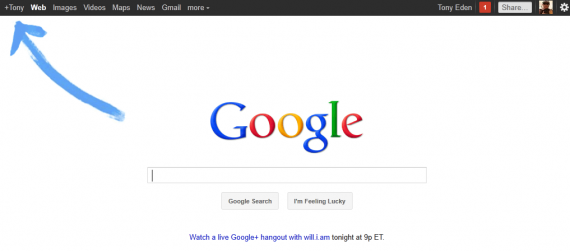
Also, keep your eyes peeled for my newest website www.GooglePlusBusinessMarketing.com that will help you and your business to get online with Google+.  One thing that I noticed today was the obvious change right on the search giant’s landing home page as shown here with a huge animated blue arrow showing you the little + sign with your name(you will have to be logged into your Google account).

googleplus 570x251 Google+ has Officially Hit the Streets

 One new exciting feature on Google+ is called Hangouts.

Google+ Hangouts are the best way for you to say, “I’m online and want to hangout!” Hangouts lets you:

  • Chill with friends that are scrolling through the web, just like you!
  • Use live video chat that puts you in the same room together!
  • Coordinate plans, whether it’s working on a project or meeting up for coffee.
  • Maybe you’re bored. Start a hangout, invite your circles, see who’s around!


Apparently Will.i.am will be hosting a hangout session tonight for new members to Google+ at 9pm ET so keep your eyes peeled!

As we can see that the WAR HAS BEGUN! Can’t wait to see the flame wars and the back and forth between the two online GIANTS, Facebook and Google+

Let me do a call to action, will you gravitate towards Google + or stay with the old trusty Facebook?

Backlinks, Good vs. Evil – The True Breakdown

Backlinks are an effective subsidiary of search engine optimization techniques which should be integrated into your complete SEO plan. By increasing our quality of backlinks, it should increase the traffic to your site through an increase in your search engine results. It is true that ninety nine percent of internet users will only scroll through the first page of search engine results which means that only the top ten sites will benefit from SEO. There are now many popular SEO techniques used to increase a company’s rank and better reach customers. One of those is backlinks.

Backlinks are considered incoming links to your website. When a visitor clicks on a link which takes them back to your website that is considered a backlink.

SEO2 Backlinks, Good vs. Evil   The True Breakdown

These can be very useful because they primarily provide easy access to your site. If a backlink is located on a non-competitive website such as a directory site, then it can easily increase your web traffic. Search engine algorithms utilize the number of backlinks to your website as part of your website’s relevancy. Backlinks are like a vote of approval from other sites. The more backlinks you have the more relevant your site and the

content therein. The higher your relevance the better your search engine page rank, primarily Google page rank. If the link is placed with content it is better. If the link is placed on its own without other links present, that is a quality backlink and it is better for search engine page ranks.

Because backlinks provide an easy and effective manner for directing traffic to a site, people have discovered ways to cheat or “game” the system and get higher ranks for their pages. These algorithms can be distinguished and when caught, the website content providers are punished. This can mean your site is removed from the search engines entirely, thus limiting your revenue. This will happen in Google, if you try to “game” Google.

If you try to “game” Google, they would most likely remove your site from the SERPS.

The key to benefiting from backlinks is to differentiate between the good and bad kinds. You always want to incorporate good backlinks. There are times when having bad reviews still help because at least they are reviews, but that rule does not apply to bad backlinks. Bad backlinks can result in your site being removed from search engines. Bad backlinks are the result of cheating the SEO system to increase your rank faster. One way to define “bad backlinks” it so describe it as buying massive amounts of backlinks or by posting too many links which are not relevant, or using linking software which then marks your website as spam.

Good backlinks will provide links on other websites which point to yours. In order to utilize good backlinks you should link on a site which already has a high page rank. You should also link on a page which lacks other links. If there are too many other links it can be marked as spam and will not catch the attention of internet users. As an example, if site A has a backlink to site B and site A is in the same marketing affliation(Site A sells car parts and site B sells spark plugs), then that is a quality backlink. You also want to link within the content of the page instead of on the sidebars or on the footer. If you can integrate the website into the content on the other website it is best. You also want to link from a relevant website.

The Small Business Guide to Social Media Success

In order for your small business to be successful with social media, sicuak media success The Small Business Guide to Social Media Successyou need to ensure that your effective social media presence is not hindered by obstacles. The first step to social media success for your small business is utilizing your time wisely. Social marketing is often pushed to the bottom of the list for small business owners.

When you begin working on your social marketing you should integrate it into a daily routine. You do not need to participate in every single social network in order to have a strong presence in social media networks. It does mean, however, that you select the mediums which best appeal to your target audience. If you have a retail store which needs to show photos, then Facebook would be the ideal social network, rather than a professional referral company which would use LinkedIn.

The second step to social media success for your small business is to converse, not sell. You want your followers, friends, etc… to be engaged. Social media is not meant to be one-way advertising. Pushy sales messages are not meant for social media. Here is where you begin conversations and build relationships, especially as a small business owner. Once you have your niche, you should raise awareness to your company brand by offering insightful content which stimulates customers.

The third step to social media success for your small business is to consider your budget. There are many costs associated with social media use, time being the biggest. If you hire help it can be costly but it might be worth the investment to outsource social media duties to a freelancer rather than hiring a full time employee.

There are many costs associated with social media use, time being the biggest.

The fourth step to social media success for your small business is to be more than a brand. While branding your company is important, you want to be more than a corporate brand. As a small business you need to be a person too. The audience which supports your social media wants to know the people behind the company name. You need to show audiences what makes your company unique and why and how they are able to identify with your products or services.

As a small business owner, it is important to cultivate your business through social media. Here you can better learn what customers think, what they like, don’t like, and with that knowledge you can offer services and products which better appeal to customers. By doing this you can earn higher levels of loyal customers while also improving your SEO strategy. In order to keep your ranks high and your customers loyal you need to maintain authenticity, consistency, and responsiveness.

Your access to potential customers is greatly increased by the use of social media. No longer are you limited to in-store promotions, paid advertising, and word-of-mouth referrals. You can link customers who might be interested directly to your keywords, active discussions, profiles and interests. By placing links to your website on your social media profile, links to your articles, and links to your YouTube videos or blogs, you can increase the number of the backlinks to your site and enhance your search engine rank.

How to Add the Wildfire iFrame Facebook Application to Your Facebook Page

Since FaceBook discontinued FBML(Facebook Markup Language) everyone is running around like a chicken with their Facebook Fan Page logo How to Add the Wildfire iFrame Facebook Application to Your Facebook Pagehead cut off trying to figure out how to get customized welcome pages up on their Facebook pages! I have ANSWERS! We’ll, one would now have to use something called iFrames and there are some Facebook applications that support these.  One is called Wildfire  application called Wildfire iFrame application.

The good news is that there are many FaceBook applications to help you create a custom page on Facebook and it’s simple as pie!

At a bare minimum, you will need an get(or create) image (.gif, .png or .jpg) that is 520 pixels wide maximum and 800 pixels maximum height.  The good news is that you CAN use images smaller than 520 x 800.  What these pages do is create a micro-website from within your own Facebook page.  How cool is that!  That’s if you want to get all  tricky and put embedded videos or click-able links or an email newsletter opt-in box.

What I want to do is show you step by step how to add the Wildfire iFrame application to your Facebook Page.

  1. Go to http://iframes.wildfireapp.com
  2. Click the “Install This App” link/button.
  3. Select the Page where you want to add the application from the drop-down list. Once you select the Page, a blue button will appear.
  4. Click the Add Wildfire’s iFrames for Pages button . You are taken to the app within your Page where you can add your basic information, such as name, e-mail address, and company information
  5. Click the Submit button.
  6. Click the On radio button if you would like to have Fan-only content (this is the default selection – if you don’t want Fan-only content then click Off and skip to ).
  7. Select either the Custom Image or Custom HTML radio button under Fans View:
    1. If you want to have a custom image for the Fan only page, click the Browse button and upload the image. When you locate the image, select it, and the filename will show in the text box. The image must be 520 pixels by 800 pixels max or it will have scroll bars. The best part of this is that you can add your own customized HTML! If you can write custom html, or if you have an HTML generator and you want to add as the Fan only content, enter your custom HTML code in the available box. This is exactly where you can add crazy customized code to this area to have things like a newsletter signup, or pretty much anything you can have on a website.
  8. Select either the Custom Image or Custom HTML radio button under Non-Fans View.  This is the image people see before they have clicked your “Like” button:
    1. Custom Image: If you have a custom image for the non-Fan view, click the Browse button and upload it by navigating to the file on your computer. When you find the file, select it, and the filename shows in the text box.
    2. Custom HTML: If you have custom HTML code that you would like to add as the non-Fan content, enter your code in the text box.
  9. Select the I Agree to Not Violate Facebook Platform Policies check box.
  10. Click the Save & Preview button.

Now, this is the moment of truth!  You now should be able to see how your custom iFrame Page working, and you can click your own “Like” button to verify that the Fan-only content works if you added Fan-only content.
Now, your Wildfire app setup is done, and you should have a HOT SHOT Welcome Page up and running!

To Set the default landing tab to be the one that your prospective fans will see:

  1. Go to Edit Page, then select the Welcome tab from the drop-down menu next to Default Landing Tab.

Social Media….Optimize for it!

social media Social Media....Optimize for it!Social Media….Optimize for it!

Social networks, social media and optimization with those networks is really flying through the web with a large popularity. Social networks as FaceBook, MySpace, Twitter, Linkedin, Ning, Tagged, Classmates, Meetup, Friendster,etc. have been in the news lately talking about how popular they have become in the past few years. Some have even been lead to beleive they they may “become the web”. Some others also include You-Tube, Del-icio.us, the list almost can go on and on! All of these give you some sort of ‘presence’ in the virtual world. More and more these days businesses and regular people are using the social media or social networks to to optimize and promote their presence through the web.

Social Media Considerations – deepen connections and relationships.

Bloggers and website owners, these days, mostly use social bookmarking sites such as Digg.com, StumbleUpon and Del-icio.us. How these sites work is that they give feedback on articles that you webmasters submit, then a judging process “judges” the articles and bumps them up based on the number of votes. This type of social media campaign, can bring massive number of visitors to your site. An article that is accepted well, can deliver a large amount of traffic and comments to that article. When a webmaster or site owner is considering their search engine optimization strategies, it’s most efficient to choose the right path for your optimization. By using all three of those social media sites, they will help a bunch, but they all differ in what they can deliver. Digg will take many votes to deliver excellent traffic, but StubleUpon will take less votes to deliver just some traffic. If you can get enough Diggs from Digg.com users, you just may get the front page of Digg. By utilizing social media the proper way, it can raise your exposure throughout the web. The more pages that a search engine bot travels throughout the site, the better ranking you could possibly have. When a write is aiming to get higher rankings, building the popularity of the site is of utmost importance and your website traffic statistics will show the story. Users will visit your site simply because they like to read your blog or your rich content. Building up a huge “friends list” on any of the social media platforms is what you want to do, if you desire to promote your business online.. You can now promote your site over and over again to your friends list. the best way is to aim to your target audience with the same ideas, feelings, and collections. You, as the writer, know these people since you are one of them..

Social Media, Working For You!

To get “Social Media” to work FOR YOU, you will need to understand and think just like the social network platforms that you are targeting. The best way to get your site looked at by Google (indexed) is to construct articles on your website or blog regularly. Social network articles, posted regularly, will allow sites as Google to have a search engines so that it makes it easy to locate your blog fast and easy. Once you get you site into the search engines, the sky i s the limit. You can get a lot of organic traffic from being indexed. Undoubtedly, this should bring some organic traffic and making it easy to direct them to social networking site of your choice. With daily,monthly or regular posting of social networking articles, you should be able to people’s trust and respect because you can provide them information they need and want.

Keep in mind that when you write articles online, consider search engine optimization alongside utilizing social media platforms for exposure.

  • Who is your target audience?
  • What time of day is your target audience online?
  • What is your goal with the article?
  • Which keywords are you looking to get more exposure on?
  • Have you placed hyperlinks throughout your article to include internal and outside links
  • Have you styled your content styled to help with reading it easier?

This might include:

  • Bullet points
  • Clearly defined subheadings (search engines appreciate this to help with indexing)
  • Key points and fascinating quotes
  • Is the article informative or educational?
  • Do you have your RSS feed setup to show targeted from the articles?

Social Media Campaigns take work. Take your social media campaign and promote it around on the social networks! Promote Promote!. Take the time to build your webtraffic organically by promoting your site(s) through your choice of social networking. If done correctly, using social networking to promote your blog or site can work. Social Media Optimization does work.